Cocoa Casino Registration: Create Your Account

Registering at Cocoa Casino takes a few minutes and unlocks access to 800+ games, a 200% welcome bonus, and daily cashback. The process runs in two steps - account data and personal details. Once verified, you can deposit, claim bonuses, and play from any device without downloading anything.

200% boost on deposit 1 + 100 spins
Get Startedwith bonus
Why You Need an Account at Cocoa Casino

Without a registered account you can browse the lobby but cannot place real-money bets or claim any promotions. Creating an account at Cocoa Casino gives you access to 800+ titles from Rival Gaming, BetSoft, Spinomenal and 12 other providers, as well as a 200% welcome bonus on your first deposit plus 100 free spins on Plucky Lucky.

The platform has operated since 2006 under SSC Entertainment N.V. with a Curacao eGaming licence (1668/JAZ), so your registration data is protected by 256-bit SSL encryption from day one. One account per person is the rule - duplicate accounts are blocked and can result in forfeited balances.

Key facts before you start:

Parameter Value
Minimum age 18 years
Registration steps 2 (account info + personal data)
Confirmation method Email verification
Countries with NDB restrictions China, Finland, Ukraine, Malaysia
Licence Curacao eGaming 1668/JAZ

Where to Find the Registration Button

On desktop, the green 'Register' button sits in the top-right corner of the header, next to the 'Login' button. On mobile, the same header is visible in the responsive browser layout - tap the hamburger menu if the header collapses, then tap 'Register'. There is no dedicated mobile app, but the site works identically on Chrome, Safari, and Firefox on both iOS and Android.

Open Registration Form

Who Can Register - Requirements

Cocoa Casino accepts players from the UK, Australia, New Zealand, parts of the EU and other international markets. Before filling the form, "confirm":

  • You are at least 18 years old.
  • You are not located in a restricted jurisdiction.
  • You have a valid email address you can access immediately.
  • All information you provide matches your official ID documents.

Providing false details is the most common reason for delayed or refused withdrawals. The KYC team checks documents before every first payout, so accuracy at registration saves significant time later.

Cocoa Casino is not registered with the UK Gambling Commission. UK players can access the platform but standard UKGC consumer protections do not apply. Check your local regulations before signing up.

Registration Methods

Cocoa Casino uses email-based registration only. There are no social login options (Google, Facebook) and no phone-number-only sign-up flow. You create a username and password during Step 1, which you will use every time you log in.

If you have a bonus code (for example, 'CAA400' for a 400% welcome match), enter it during the registration or deposit step - codes sent by email are sometimes tied to the session.

What the Registration Form Asks

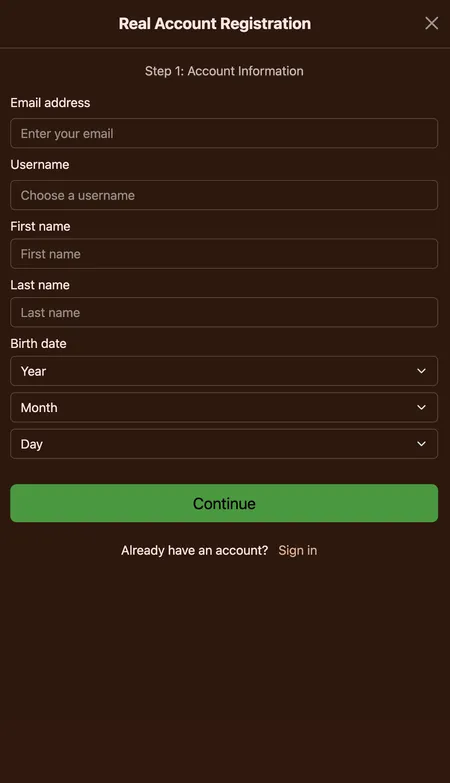
Step 1 - Account Information

  • Email address (used for verification and future communications)
  • Username (visible in the lobby; cannot be changed later)
  • Password (choose a strong, unique password - at least 8 characters mixing letters and numbers)
  • Agreement to Terms and Conditions and confirmation of age 18+

Step 2 - Personal and Contact Details

  • Full legal name (must match your ID document)
  • Date of birth
  • Residential address
  • Country of residence
  • Phone number

Double-check every field before submitting. Typos in your name or address are the main cause of KYC delays.

Start Registration

Registration Step by Step

  1. Cocoa Casino registration step one form

    Step 1. Click 'Register' in the top-right header. Fill in your email, choose a username and set a password. Tick the Terms and Conditions box. Click 'Next'.

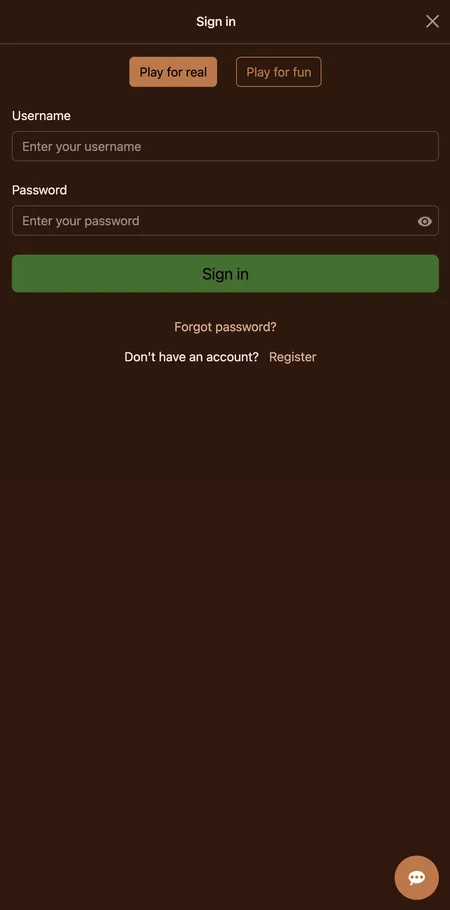
  2. Cocoa Casino login screen after registration

    Step 2. Complete your personal details: full name, date of birth, address, country and phone number. Submit the form. Check your inbox for a verification email and click the confirmation link to activate your account.

Email Confirmation - What Happens Next

After submitting the form, Cocoa Casino sends an automated email to the address you provided. Click the link inside to activate your account. If the email does not arrive within five minutes:

  • Check your spam or junk folder.
  • Make sure the address was typed correctly (no extra dots or spaces).
  • Use the 'Resend verification' option on the login page.

The no-deposit bonus of 50 free spins on Zeus Thunder Fortunes (wagering 50x, max cashout $50, valid 7 days) is often tied to email confirmation - you may need to activate it manually in the Promotions section after verifying.

Registering on Different Devices

Cocoa Casino is a browser-based platform with no downloadable app. The site adapts to screen size automatically, so the registration form works the same way on:

  • Desktop (Windows, macOS): Full form visible without scrolling on most screens.
  • Mobile browser (iOS/Android): Form is stacked vertically; Chrome and Safari both render it cleanly.
  • Tablet: Desktop layout with touch-friendly inputs.

Platform uptime is reported at 98.7%, and the sign-up page loads quickly even on slower mobile connections. Learn more about mobile access on the Cocoa Casino mobile page.

Your First Login After Registration

Once email verification is complete, return to the site and click 'Login' in the top-right corner. Enter your username (or email) and password. You will land directly in the lobby with your account balance visible. There is no automatic re-login if you close the browser tab - sessions expire for security reasons, so keep your password saved in a password manager rather than a sticky note.

Log In to Your Account

Registering via Mobile - Key Differences

The mobile registration experience is functionally identical to desktop. There is no separate app registration flow. If you want to add Cocoa Casino to your home screen, use the 'Add to Home Screen' option in your mobile browser - this creates a shortcut that launches the site in a full-screen view without the browser toolbar.

All 160 mobile-optimised games, bonuses, and the full banking section are accessible immediately after registration on mobile.

KYC Verification After Signing Up

Account creation and KYC verification are separate steps. You can register, deposit, and play without submitting documents. However, before your first withdrawal, the KYC team requires:

Document Accepted formats
Government-issued photo ID Passport or driving licence
Proof of address Utility bill or bank statement (max 3 months old)
Card authorisation (if paying by card) Photo of card (middle digits and CVV hidden) plus signature

Internal verification takes 48-72 hours and operates Monday to Friday. Preparing documents right after registration avoids delays when you first request a payout. Once verified, your status is retained as long as your personal details do not change.

Players who complete KYC before their first withdrawal request typically see funds processed within 1-3 business days via e-wallet or crypto, compared to up to 12 working days for unverified accounts.

Password Choice and Account Security

Cocoa Casino secures all data with 256-bit SSL encryption. On your side, password strength matters:

  • Use at least 8 characters.
  • Mix uppercase, lowercase, numbers and a special character.
  • Do not reuse a password from another site.

Password recovery is handled via the 'Forgot Password' link on the login page, which sends a reset link to your registered email. Two-factor authentication is not separately advertised, so your email inbox is the main recovery route - keep that account secure too.

Common Registration Problems and Fixes

'Email already in use' - You have an existing account. Use the Login page and 'Forgot Password' if needed. One account per person is enforced.

Verification email not arriving - Check spam; wait 10 minutes; request a resend. Add [email protected] to your safe senders list.

Form submission error - Usually a field left blank or a phone number in the wrong format. Country codes must match the selected country.

Account not activating - The verification link expires after a set period. Request a new link from the login page.

If none of these resolve the issue, live chat is available 24/7 and can manually trigger a new confirmation email.

Contact Support

Bonuses Available After Registration

Once your account is active and email confirmed, you can claim:

  • No-deposit bonus: 50 free spins on Zeus Thunder Fortunes - wagering 50x, max cashout $50, valid 7 days. Requires minimum $10 deposit to withdraw winnings.
  • First deposit bonus: 200% match up to your deposit amount plus 100 free spins on Plucky Lucky. Minimum deposit $15-20; wagering 30x-35x on deposit plus bonus.
  • Crypto welcome bonus: 300% match on first Bitcoin deposit (code 300BTC); wagering 38x; minimum deposit $25.

Full terms, game restrictions, and cashout caps are listed on the Cocoa Casino bonuses page. Progressive jackpot games are excluded from bonus play across all offers.

Managing Your Profile After Registration

Inside the personal account dashboard you can:

  • View real-money and bonus balances separately.
  • Browse your full deposit, withdrawal, and bet history.
  • Set deposit limits and session timers under the Responsible Gaming section.
  • Activate self-exclusion if needed.
  • Earn COMP points on every real-money bet (1,000 points = $1 cashable without wagering).

Updating personal details after registration is possible via account settings, but major changes (name, address) may trigger an additional KYC review before your next withdrawal is processed.

FAQ - Registration at Cocoa Casino

Can I register from the UK?

Yes, UK players can register. Note that Cocoa Casino holds a Curacao licence, not a UKGC licence, so UK-specific consumer protections do not apply. Check your local gambling laws before signing up.

How long does registration take?

The two-step form typically takes 3-5 minutes to complete. Email verification adds a few more minutes. You can start playing in demo mode while waiting for the confirmation link.

Is there a minimum age to register?

Yes, you must be at least 18 years old. The platform enforces this during registration and KYC verification.

Can I have two accounts?

No. Cocoa Casino strictly enforces a one-account-per-person policy. Duplicate accounts are closed and any associated balances may be voided.

What currencies can I use after registration?

Supported account currencies include GBP, EUR, USD, AUD, ZAR and Bitcoin. Select your currency during registration as it cannot be changed later.

Do I need to verify my identity to start playing?

You can play after email confirmation without submitting KYC documents. Verification is mandatory only before your first withdrawal.

What if my verification email does not arrive?

Check spam, wait 10 minutes, then use the 'Resend verification' option on the login page. If the problem persists, contact live chat available 24/7.

Can I claim the no-deposit bonus right after registration?

Yes. The 50 free spins on Zeus Thunder Fortunes are available after registration and email confirmation. Activate the offer in the Promotions section. Wagering is 50x and max cashout is $50.

Is registration available on mobile?

Yes. The registration form works in any mobile browser on iOS or Android. There is no dedicated app, but the browser version is fully optimised for mobile screens.

What documents are needed for KYC?

A government-issued photo ID (passport or driving licence), proof of address dated within 3 months (utility bill or bank statement), and if paying by card, a completed Card Authorisation Form.

Your Cocoa Casino account is a few clicks away. Register now to access 800+ games and your welcome bonus.